
Building “scalable mobile apps” is not just about writing frontend code and calling APIs…
It’s actually one of the toughest parts of software engineering!
Mobile apps don’t run in ideal environments. The network can go down, batteries run low, the operating system can close your app in the background, devices vary, and users still expect everything to work instantly, even offline.
When building mobile apps, you always have to think about limits. Every decision affects speed, stability, data safety, security, and user experience simultaneously. And making the right choices turns a simple app into a strong, production-ready package.
In this article, we’ll focus on 53 concepts for building scalable and efficient mobile applications.
For each concept, I’ll cover:
- What it is and how it works
- Real-world example
- The tradeoffs
- Why it matters for mobile
But before we get into the concepts, let’s first understand what mobile system design really means…
What is Mobile System Design?
Mobile system design is about planning how a mobile app works in the background.
It includes how the app connects to servers, saves and reads data, stays fast, keeps user data safe, and handles errors.
It’s not just about designing screens. It’s about understanding how data flows within the app, what happens when the network goes down, how the app runs in the background, and how it works across different devices.
Now that we understand what mobile system design means, let’s start with one of the most important parts: how your app connects and communicates with the outside world.
Networking & Real-Time Communication
This section explains how a mobile app connects to servers and handles real-time data…
You’ll learn how apps send and receive data, choose the right APIs, and handle slow or unstable networks so the app stays fast and reliable.
1. Client-Server Architecture (Thick vs Thin Clients)
When building a mobile app, an important question to ask is: how much work should the phone handle, and how much should the server do?
There are two main approaches:
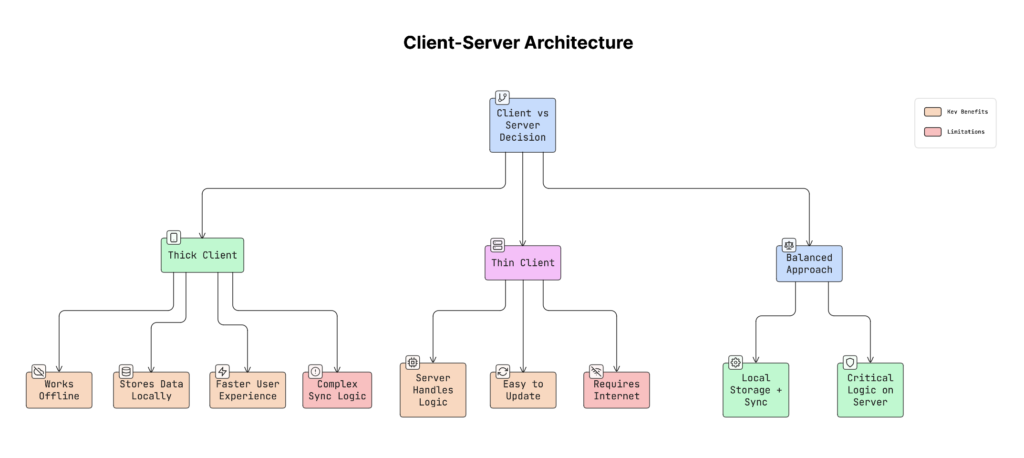
a. Thick Client
A thick client means the app does most of the work on the device.
It can:
- Save data on the phone
- Handle some logic by itself
- Sync data later in the background
- Work without network connectivity
Most modern apps use this approach because:
- The network is not always stable
- Phones are powerful now
- Users expect apps to work offline
b. Thin Client
A thin client means the app does very little on the device.
It:
- Sends requests to the server
- Waits for the server to process everything
- Shows whatever the server returns
If the network fails, the app mostly stops working.
Why It Matters
This decision affects your entire app design:
- Whether your app can work offline
- How difficult syncing will be
- How easily you can update features
- How much important logic stays on the server
Real-World Example
- Gmail is a “thick” client. You can read emails and write drafts even without network connectivity. It syncs later.
- A simple app that only loads a website is a thin client. It’s useless without the network.
Trade-offs
- Thick client: Faster and works offline, but syncing and updates can be harder.
- Thin client: Easy to update and simpler to build, but it doesn’t work well with a bad network.
Practical Advice
For most apps:
- Keep the main app logic thick (use local storage and background sync).
- Keep sensitive logic on the server (like payments, login, pricing, fraud detection).
This gives you the best balance between speed, reliability, and security.
Once you decide what the app and the server should handle, the next question to ask is: How they should communicate, especially when you need real-time updates?
2. WebSockets & Persistent Connections
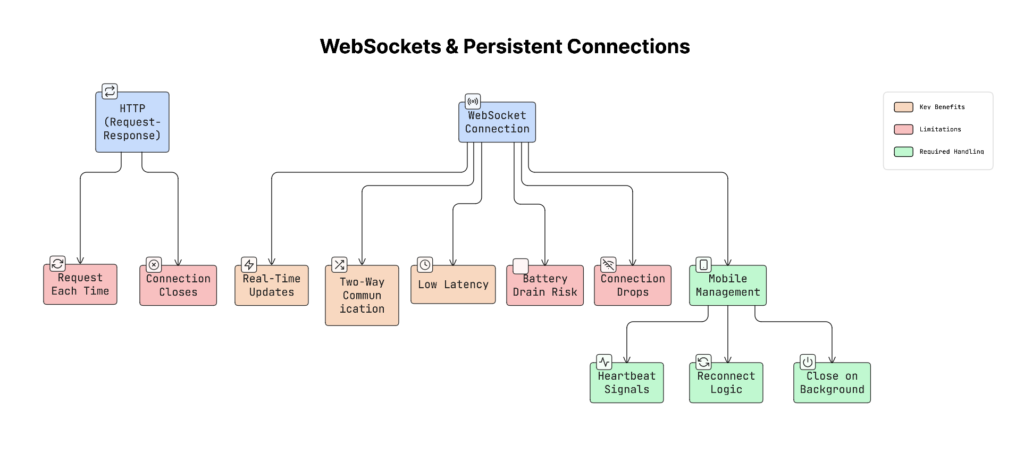
Usually, mobile apps use HTTP requests to talk to a server.
That means:
- App asks for data
- Server sends a response
- Connection closes
If the app needs new data, it has to ask again.
WebSocket works differently…
It creates a long-lasting connection between the app and the server.
Once connected:
- App can send data anytime
- Server can also send data anytime
- Connection stays open
This is called real-time communication.
Why It Matters
With normal HTTP, the app must keep asking:
- “Any new messages?”
- “Any updates?”
With WebSockets, the server sends updates immediately when something happens.
This is very important for:
- Chat apps
- Live sports scores
- Stock price updates
- Multiplayer games
- Collaborative tools
If updates are slow, users feel like the app is broken.
Real-World Example
Apps like Slack, WhatsApp, and Figma use WebSockets.
When someone sends a message, you see it instantly because the server pushes it directly to your app.
Important Things to Remember (For Mobile)
On mobile devices, keeping a connection open all the time can drain the battery, use more data, and cause the operating system to close it.
Instead:
- Send small ‘heartbeat’ signals to keep it alive
- Reconnect if the network drops
- Close the connection when the app goes to the background
Otherwise, the connection may appear active but stop working.
How It Works
- App starts with a normal HTTP request.
- Server upgrades it to a WebSocket connection.
- After that, both sides can send messages at any time.
- Connection stays open until one side closes it.
Trade-offs
Pros
- Very fast (low latency)
- Instant updates
- Two-way communication
Cons
- Harder to manage
- Needs reconnect logic
- Can affect the battery if not handled properly
In simple words, use WebSockets when your app needs instant updates. Just manage the connection carefully on mobile devices.
But not all updates require a constant open connection.
What if the app is completely closed?
That’s when push notifications become useful…
3. Push Notifications (APNs & FCM)
Push notifications let your app send updates, such as “Your order has been picked up”, “You got a new message”, “Your payment was successful”, to users even when the app is closed.
But here’s the important part: Your app does not stay connected to your server all the time.
Instead, special services handle this for you:
- APNs (Apple Push Notification Service) for iPhones
- FCM (Firebase Cloud Messaging) for Android
These services act like messengers between your server and the user’s phone.
How It Works
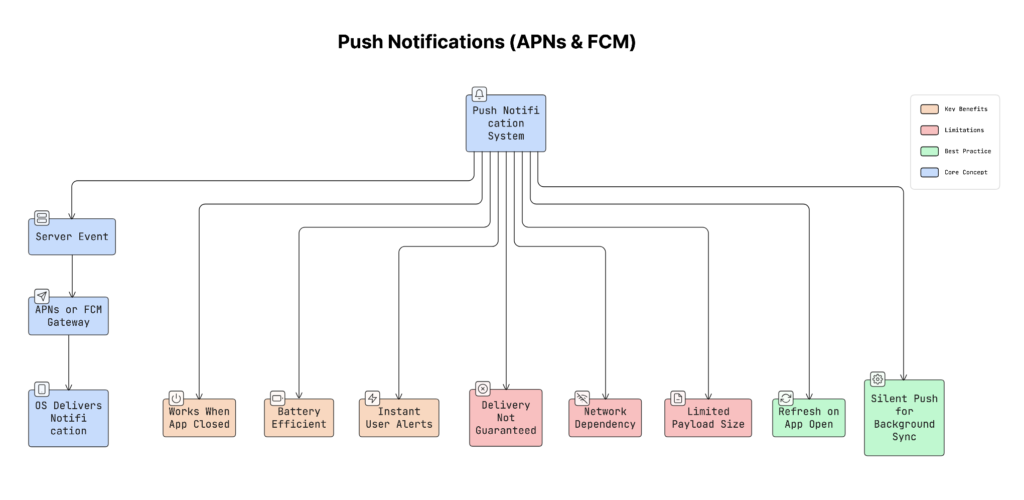
- Something happens on the server (e.g., a new message).
- Server sends the notification to APNs (iOS) or FCM (Android).
- APNs/FCM deliver it to the user’s device.
- The mobile phone’s operating system shows the notification.
- If needed, the app wakes up in the background.
Your app does NOT keep a permanent connection.
The phone’s operating system manages a “single” shared connection for all apps to conserve battery.
Why It Matters
Without push notifications, your app would need to stay connected all the time and keep checking for new updates. Neither iOS nor Android allows this because it drains battery.
Push services solve this problem in a battery-efficient way.
Real-World Example
Imagine a food delivery app. When your order is picked up:
- The backend sends a push notification using FCM or APNs.
- Your phone receives it instantly.
- Even if the app is fully closed, you still get the update.
Trade-offs
Pros
- Saves battery
- Works even if the app is closed
- Delivers updates quickly
- No need for a constant background connection
Cons
- Delivery is not 100% guaranteed
- Can fail on a poor network
- Limited message size
- Should not be used for very critical data
You should never assume the user received the notification. Always refresh or sync data when the app opens.
Pro Tip
You can send a silent push notification (background push).
This shows nothing to the user. It simply wakes the app in the background to fetch fresh data. So when the user opens the app, everything updates without a loading spinner.
Push notifications are useful for sending updates to users even when the app is closed. But in many cases, the app itself needs to fetch updates from the server while it’s running.
In such situations, use techniques such as polling, long polling, or Server-Sent Events.
4. Polling, Long Polling & SSE
Sometimes apps need server updates, but using WebSockets isn’t always necessary or practical. In those cases, use simpler methods such as polling, Long Polling, or Server-Sent Events (SSE) to receive updates from the server.
Each method works a little differently.
Why It Matters
Not every feature needs instant real-time updates:
- Metrics dashboard might refresh every 30 seconds.
- Notification count might update every few seconds.
Using WebSockets for these cases can be unnecessary and complex. Choosing the right approach can save server resources and keep the system simple.
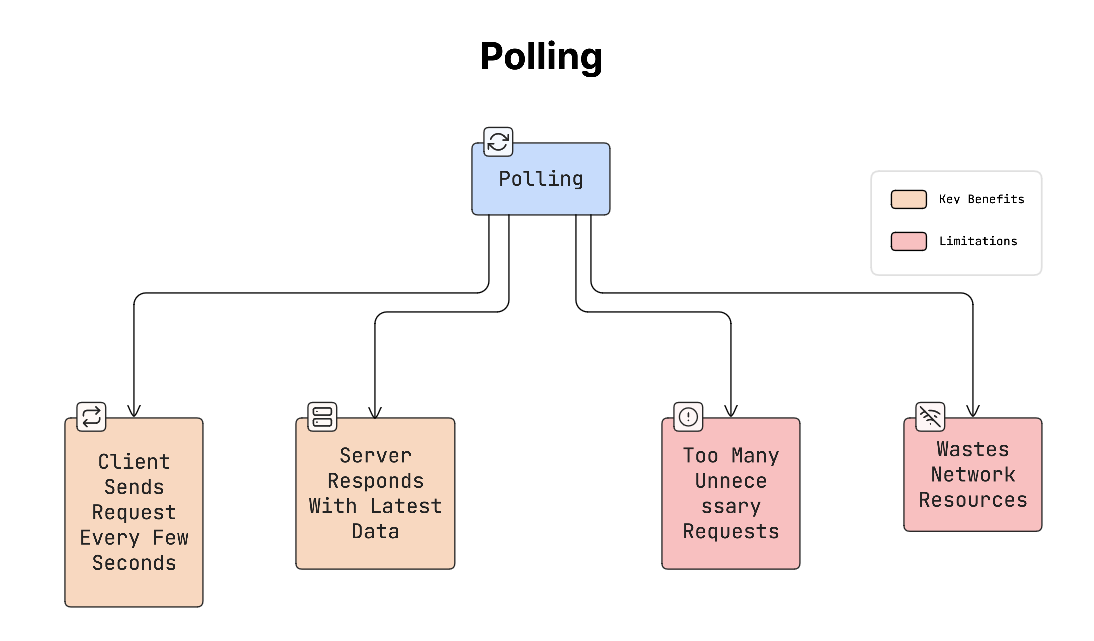
a. Polling (Short Polling)
Polling is the simplest method.
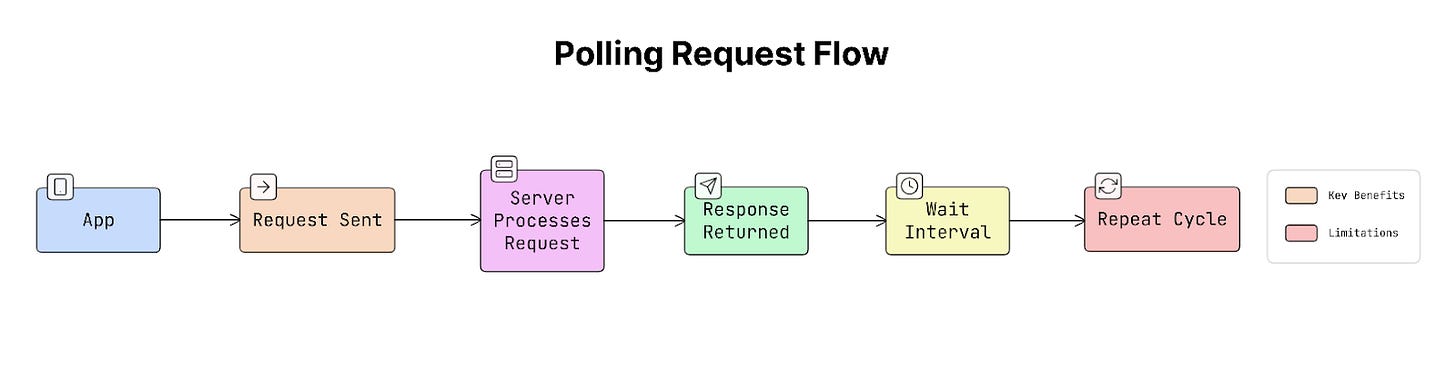
The app requests updates from the server at fixed intervals:
- Every 10 seconds, the app sends a request.
- The server responds with new data (if any).
So the process looks like this:
Problem:
Most of the time, there’s no new data, yet the app keeps asking the server. This wastes network and server resources.
b. Long Polling
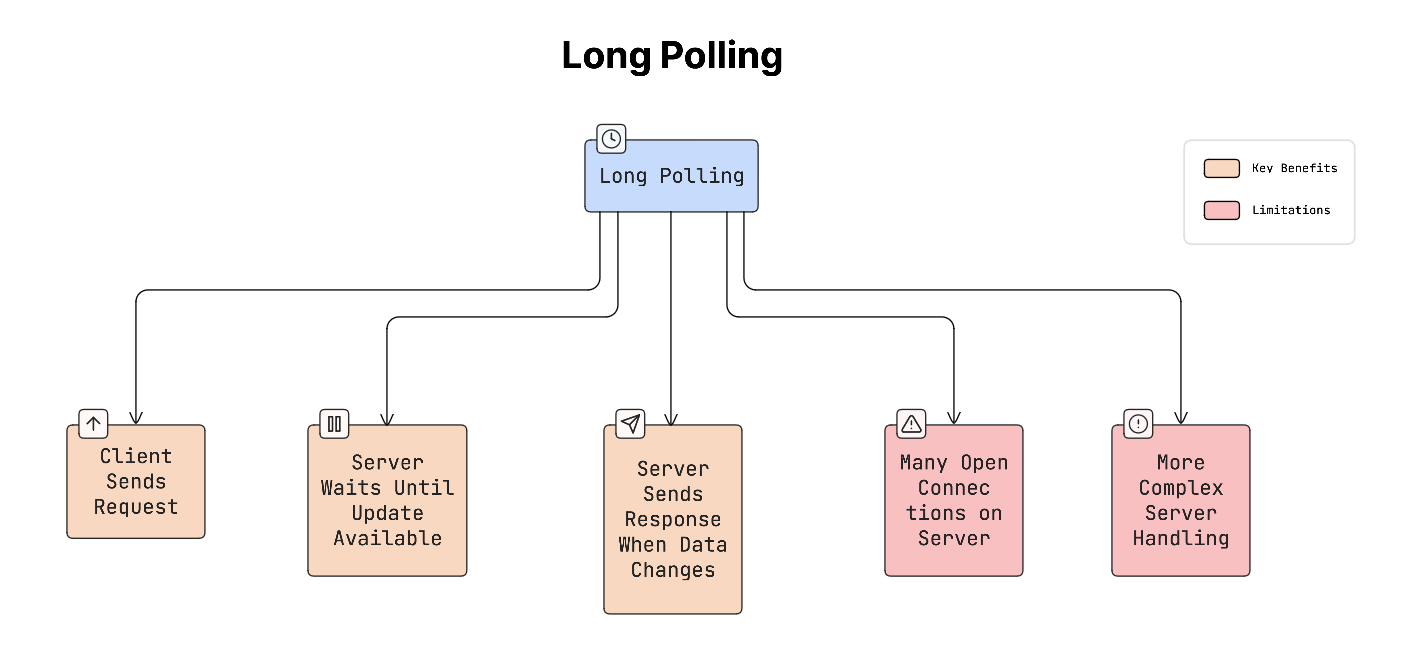
Long polling improves on basic polling.
Instead of responding immediately, the server keeps the request open until new data is available.
How it works:
- App sends a request.
- Server waits until something changes.
- When new data arrives, the server sends the response.
- The app immediately sends another request.
This reduces unnecessary requests compared to short polling.
Yet it still requires managing many open connections on the server.
c. Server-Sent Events (SSE)
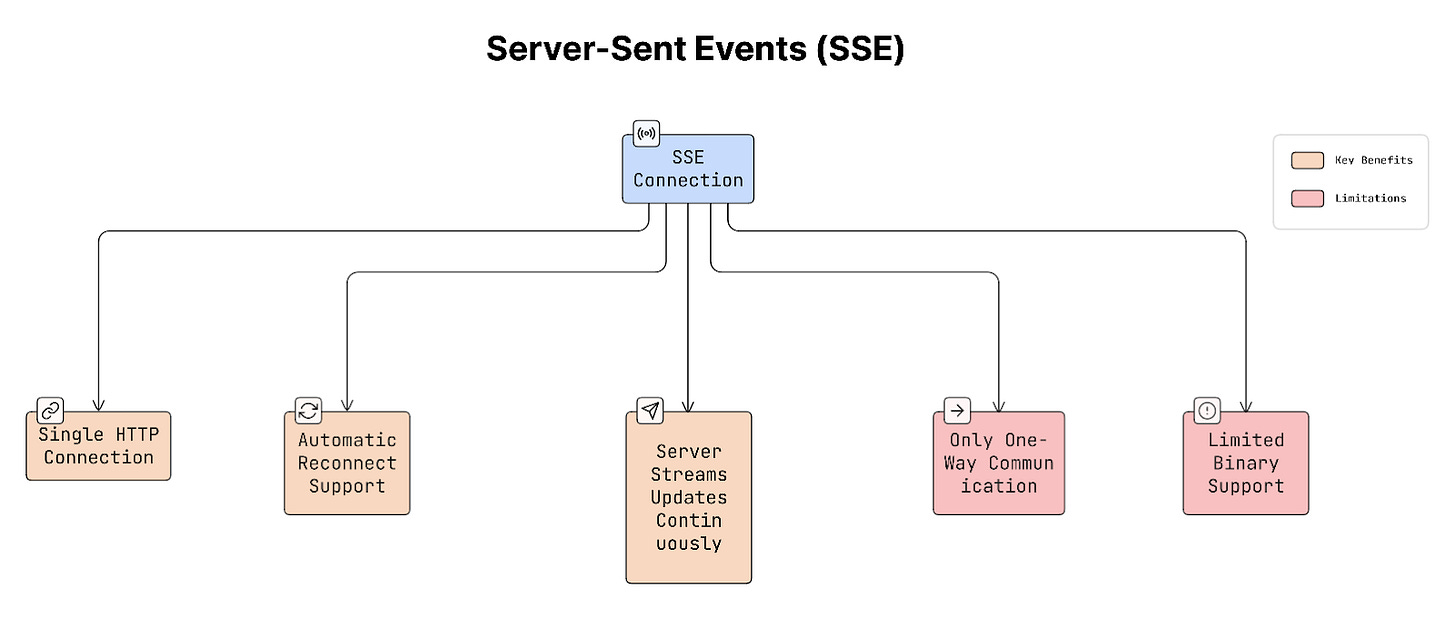
SSE allows the server to push updates to the client over a single open HTTP connection.
How it works:
- Client sends a request.
- Connection stays open.
- Server sends updates whenever something happens.
The client keeps listening for these updates.
SSE also has automatic reconnection built into browsers through the EventSource API.
Real-World Example
- GitHub uses SSE to stream live action logs.
- Many analytics dashboards use polling every few seconds.
- Early versions of Twitter used long polling for real-time updates.
Trade-offs
- Short Polling: Simple to implement, but wastes resources if there are no updates.
- Long Polling: More efficient than polling, but harder to manage on the server.
- SSE: Efficient for real-time updates and simple compared to WebSockets, but communication is one-way (server → client only).
The bottom line:
- Polling: Client repeatedly asks for updates.
- Long Polling: Server waits until new data appears.
- SSE: Server pushes updates over a single open connection.
These approaches are useful when WebSockets are unnecessary or unavailable, which helps you keep the system simple and efficient.
Once you understand how apps receive updates from the server, the next step is deciding how the app requests data from the server.
This is where API design becomes important.
APIs define how the mobile app and server communicate, what data is requested, and how that data is returned.
5. REST vs GraphQL vs gRPC
There are different ways to design APIs.
Three common approaches are REST, GraphQL, and gRPC. Each one has its own advantages depending on the type of app you’re building.
REST
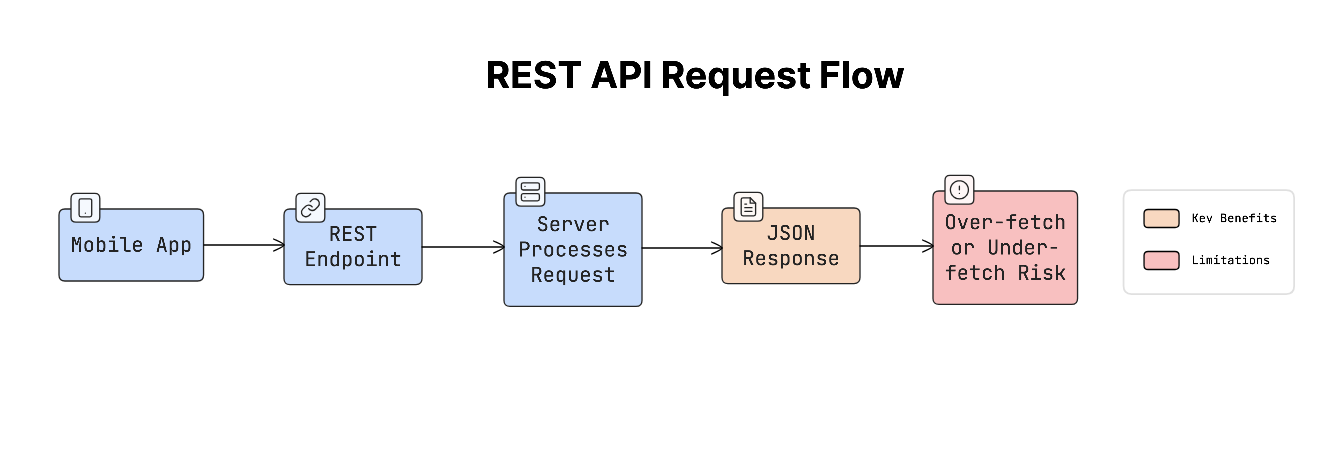
REST (Representational State Transfer) is the most common and widely used API style:
- App calls specific endpoints like
/users, /orders, /products. - Server returns predefined data.
It is simple and easy to understand, which is why many mobile apps use it.
But REST can sometimes return too much or too little data.
For example, a screen needs only the user’s name and profile photo, but the API returns email, address, preferences, and more. This is called over-fetching.
Sometimes the opposite happens: the app needs multiple API requests to load one screen. This is called under-fetching.
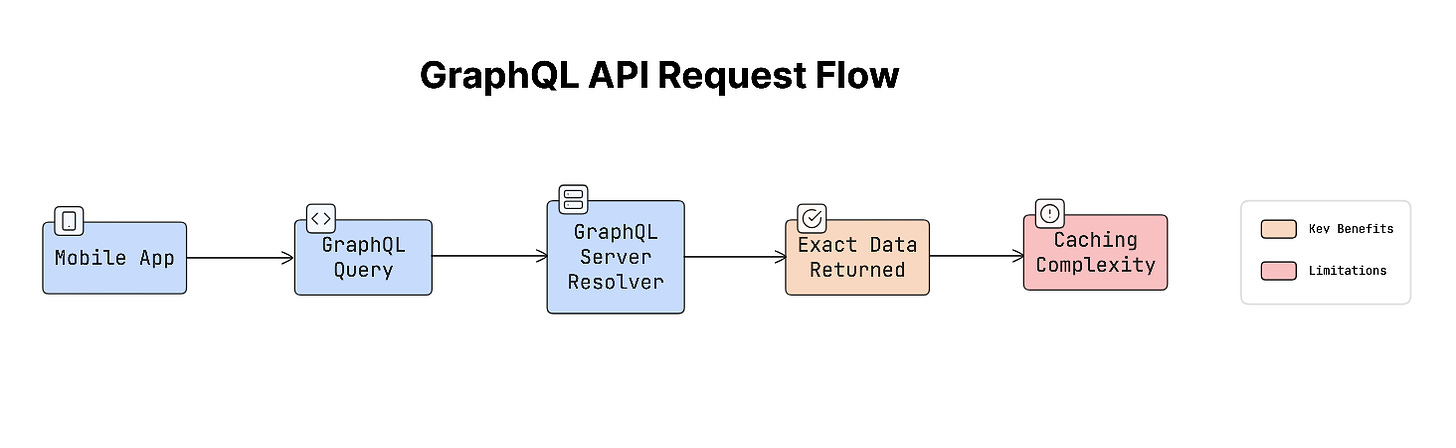
GraphQL
GraphQL was designed to address the problems of over-fetching and under-fetching.
With GraphQL:
- Client asks for exactly the data it needs.
- Server returns only that data.
Example request:
GetUser {
  name
  profilePhoto
}
This makes GraphQL very useful for complex mobile interfaces where different screens need different types of data. Yet GraphQL can be harder to cache and secure compared to REST.
gRPC
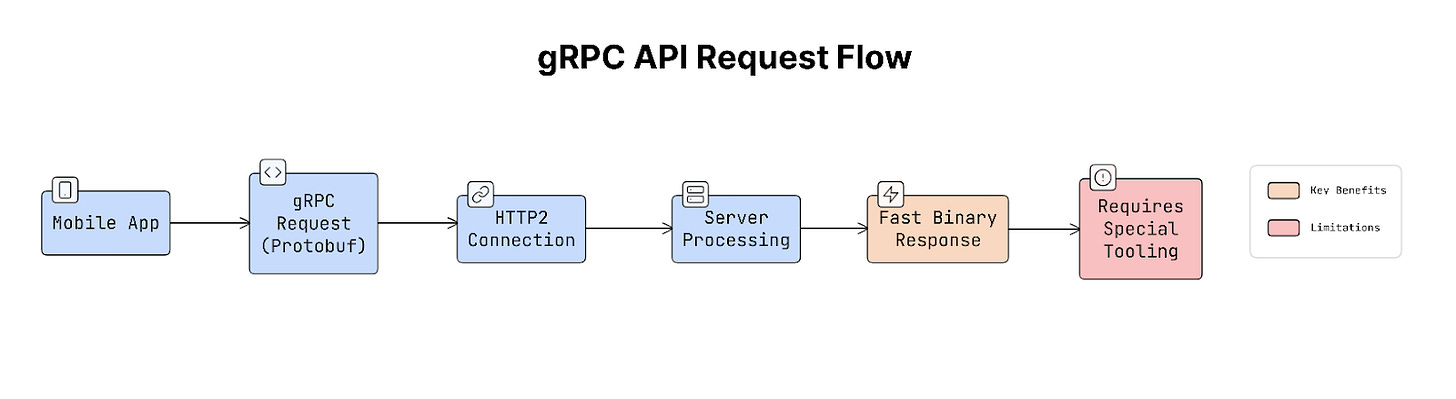
gRPC is another approach focused on high performance.
Instead of sending JSON data like REST or GraphQL, gRPC uses a binary format called Protocol Buffers, which is smaller and faster.
It runs over HTTP/2, which allows faster communication between services. Because of this, gRPC is often used for internal microservices, backend communication, and high-performance mobile systems.
But it requires special tooling and is less common for public APIs.
Why It Matters
The API style you choose affects network speed, battery usage, number of requests, and app performance.
If an API returns too much data, it wastes bandwidth and battery. If it returns too little, the app needs more requests, which increases latency. Choosing the right approach helps keep the app fast and efficient.
Real-World Example
- Facebook created GraphQL because its mobile apps needed many REST requests to load a single screen.
- GitHub moved its public API to GraphQL.
- Google uses gRPC internally for inter-service communication.
Trade-offs
- REST: Simple, widely supported, and easy to cache, but sometimes returns too much or too little data.
- GraphQL: Clients request exactly the data they need and great for complex UIs, but caching and security can be more complicated.
- gRPC: Very fast, efficient, and great for internal services, but requires HTTP/2 and special tooling.
Practical Advice
A common approach in real systems is:
- REST for simple CRUD APIs.
- GraphQL for complex UI data requirements.
- gRPC for internal communication between services where performance matters most.
Once you decide how the app will request data from the server, the next step is making sure those requests still work properly when the internet connection is unstable.
6. Network Resilience (Exponential Backoff & Retry Strategy)
Mobile networks can be slow, unstable, or unavailable.
As a result, requests may fail due to weak signals, timeouts, or temporary server issues. Instead of failing immediately, most apps retry the request after a short delay.
Yet retrying requests often can cause serious problems.
Why It Matters
Imagine thousands of mobile apps trying to reconnect at the same time after a server outage.
If every app retries instantly, the server suddenly receives a huge number of requests at once. This can overload the server again, causing another failure. This situation is called the thundering herd problem, when many clients try at the same time and overwhelm the system.
A good retry strategy spreads these retries over time so the server can recover…
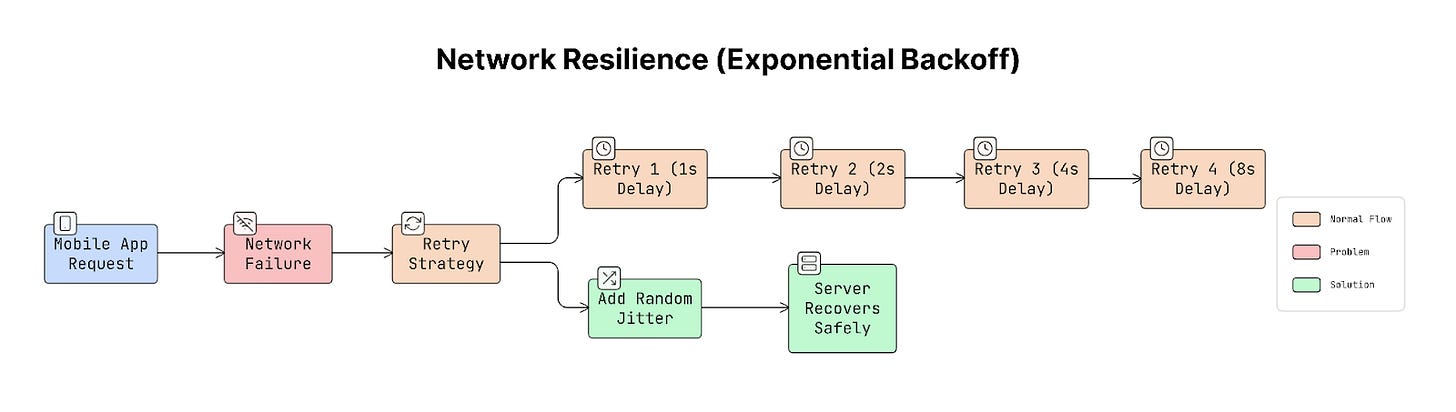
Exponential Backoff (The Common Solution)
To avoid retrying too aggressively, apps use exponential backoff. This means the app waits longer between each retry:
- First retry → wait 1 second
- Second retry → wait 2 seconds
- Third retry → wait 4 seconds
- Fourth retry → wait 8 seconds
Each retry waits longer than the previous one. Thus reducing pressure on the server.
Adding Jitter
If every app waited the exact same time, they would still retry together.
To avoid that, add jitter, which is a small random delay. For example, retry after 4 seconds + random delay.
This spreads the requests over time instead of sending them all at once.
Real-World Example
Many popular services, such as AWS SDK, Google Cloud client libraries, and Stripe API clients, use this strategy by default. This approach is considered the standard for reliable network communication.
Trade-offs
Retry strategies must balance reliability and user experience.
If the app takes too long to retry, the user may wait too long for a response. If it retries too quickly, it might overload the server.
To handle this, many systems use a circuit breaker.
A circuit breaker stops retrying after several failures and shows a clear error message instead of retrying forever.
After adding retries to handle network failures, another challenge arises: what happens if the same request is sent many times?
Sometimes a request reaches the server successfully, but the response never reaches the app because the network drops.
If the app retries the request, it could perform the same action again…
7. Idempotency in APIs (Safe Retries)
In mobile apps, network requests can fail halfway through.
For example:
- App sends a request to the server
- Server successfully processes it
- But the response never reaches the app because the internet connection drops
From the app’s perspective, the request appears to have failed, so it retries it. If the server processes the request again, the action may happen twice.
This is where idempotency becomes important.
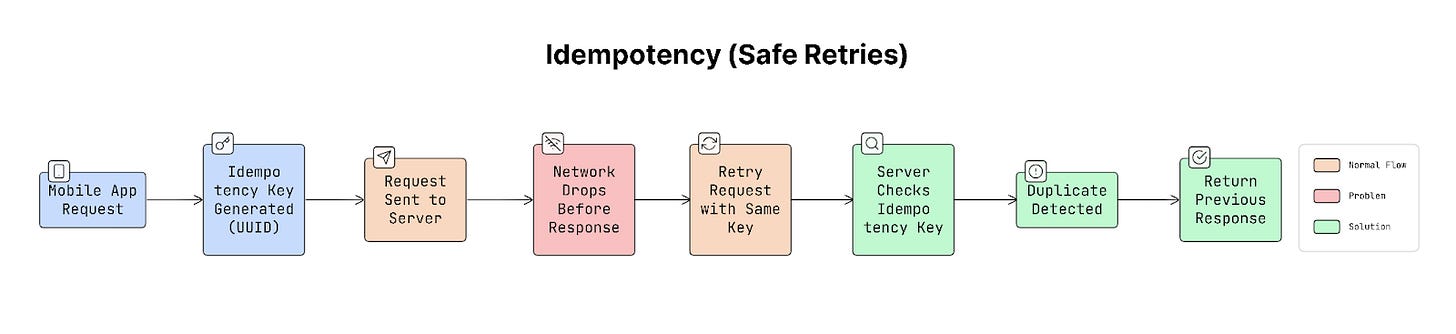
Idempotency means sending the same request many times produces the same result, rather than repeating the action.
How Idempotency Works
To make retries safe, the client sends a unique identifier with each request, called an idempotency key. This key is usually a unique ID (UUID) generated by the app.
Example request header:
Idempotency-Key: 8f3c2c2e-92f1-4f9b-b8b0-1b0f1b1a3e3f
When the server receives a request:
- It checks whether this key was used before.
- If the key is new, the server processes the request normally.
- If the same key appears again, the server does NOT repeat the action. Instead, it returns the previous response.
This prevents duplicate operations.
Why It Matters
Imagine a user taps the “Pay” button.
- The payment request reaches the server.
- Server processes the payment successfully.
- But the response never reaches the phone because the network drops.
So the user taps “Pay” again!
Without idempotency, the user might be charged twice.
This is why idempotency is extremely important for operations that change data.
Real-World Example
Many large systems rely on idempotency:
- Stripe requires an Idempotency-Key for payment API calls.
- Uber uses idempotency keys for ride requests.
- Most financial systems use this approach to prevent duplicate transactions.
Trade-offs
To support idempotency, the server must store previously used keys and their responses for a period of time (typically 24 hours).
This requires some storage, but the cost is small compared to the problems caused by duplicate operations.
It’s also important to design the key carefully, usually combining:
- user ID
- operation type
- unique request ID
Practical Tip
The idempotency key should be generated on the client before the request is sent. The app should also save the key locally.
If the app crashes or restarts, it can retry the request using the same key, ensuring the action is not repeated.
After making retries safe, the next step is to improve the app’s efficiency when communicating with the server. One important way to do this is by reducing the number of network requests the app sends.
8. Request Batching & Payload Optimisation
Every time a mobile app sends a request to the server, it adds latency and uses battery.
The total time for a request to reach the server and its response to return is called a network round-trip.
If an app sends many small requests separately, it can slow down the app and drain the device’s battery.
To solve this, use these two techniques:
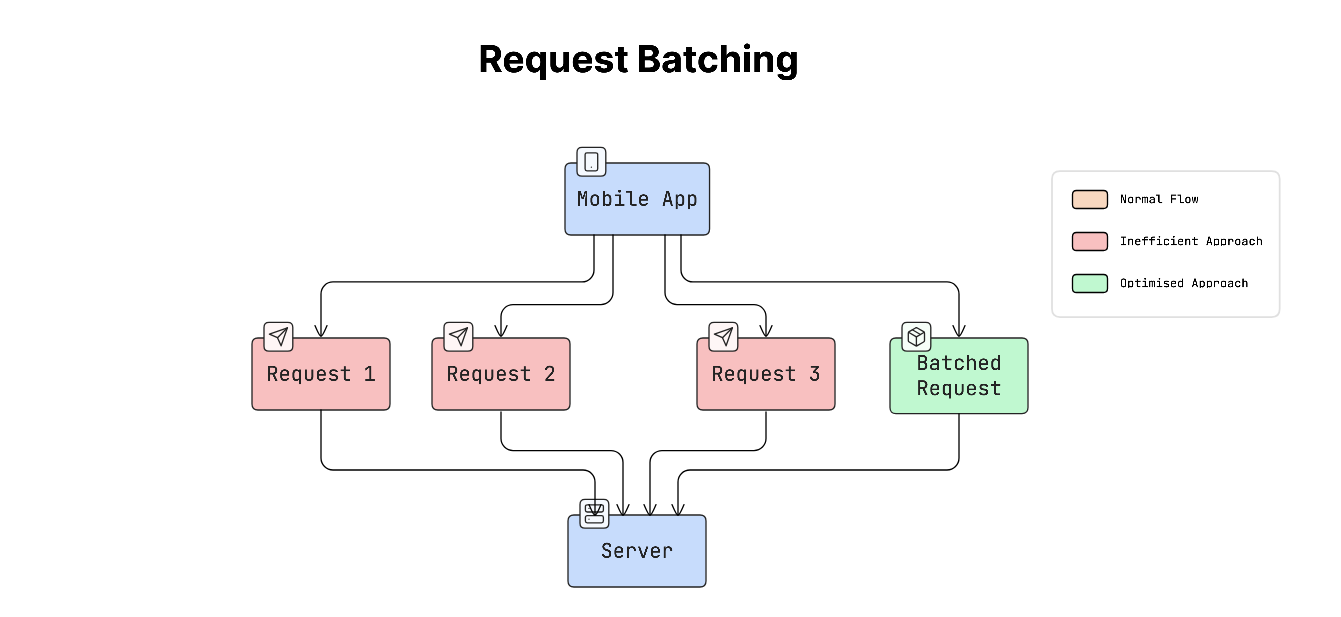
- Request batching
- Payload optimisation
a. Request Batching
Request batching combines multiple requests into a single request.
Instead of doing this:
App → Request 1
App → Request 2
App → Request 3
The app sends one combined request:
App → Batch Request (Request 1 + Request 2 + Request 3)
This reduces the number of times the app needs to communicate with the server.
b. Payload Optimisation
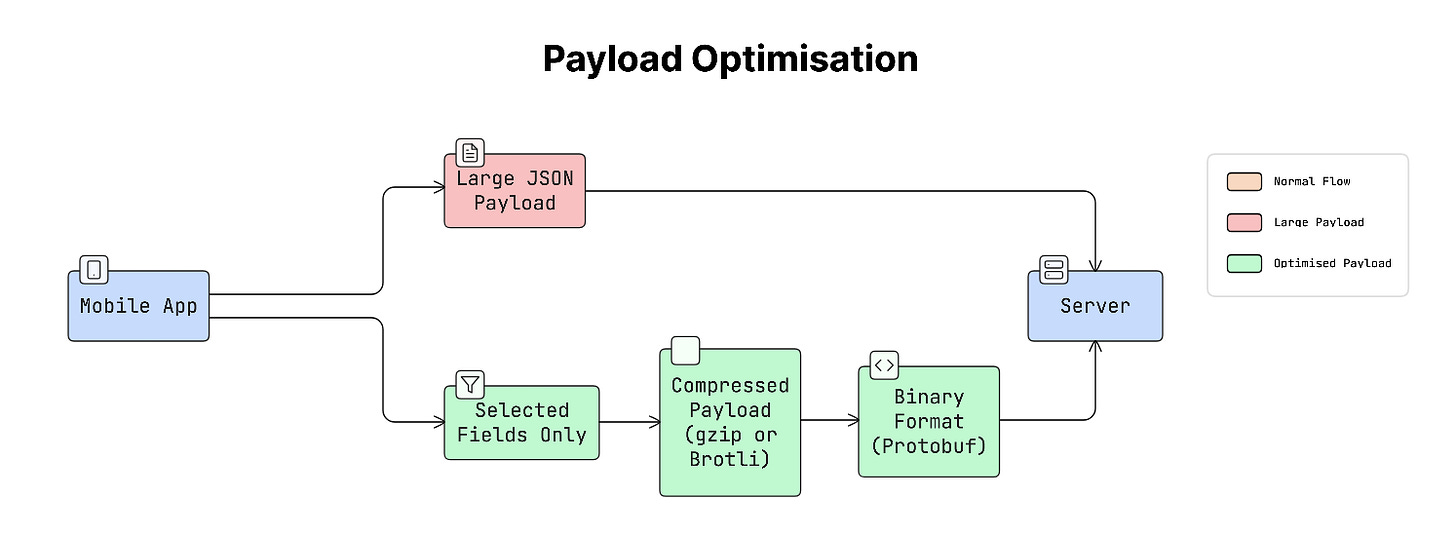
Payload is the data sent between the app and the server.
Payload optimisation focuses on reducing the amount of data being transferred.
This can be achieved by:
- Compression (like gzip or Brotli)
- Sending only the needed fields
- Using efficient formats like binary data instead of large text formats
Reducing the app’s payload size helps it load faster and use less network data.
Why It Matters
On mobile devices, sending a request wakes up the device’s network radio (the hardware responsible for communication).
This wake-up process takes time and consumes battery.
For example:
- Sending 10 separate requests means the radio wakes up 10 times.
- Sending 1 batched request wakes the radio only once.
So batching requests can significantly reduce both latency and battery usage.
Real-World Example
Many popular apps use batching to improve performance.
- Facebook batches many GraphQL queries into a single HTTP request.
- Instagram loads images gradually but fetches data for the next screen in a single batched request.
This makes the app feel faster and smoother.
Trade-offs
Batching improves efficiency but also introduces challenges.
- If the app waits too long to collect requests before batching them, it can add extra delay.
- Another challenge is handling errors. For example, if a batched request contains 10 operations and 3 fail, the system must handle those failures properly.
To balance this, many systems use a short batching window, usually around 50–100 milliseconds, to collect requests before sending them together.
After reducing the number of network requests, another challenge appears when apps need to upload large files, such as photos, videos, or documents.
Large uploads can easily fail on mobile networks because connections may drop or become unstable. To handle this, apps use a technique called resumable uploads.
9. Resumable Uploads (Chunked Uploads)
When a mobile app uploads a large file, such as a 100MB video, sending the entire file in a single request is risky.
If the network disconnects halfway through the upload, the whole upload may fail. The app would have to start again from the beginning.
To avoid this problem, use resumable uploads, also called chunked uploads.
How Chunked Uploads Work
Instead of uploading the entire file at once, it’s split into smaller parts, called chunks.
For example, a 100MB file might be divided into 10 chunks of 10MB each, and each chunk is uploaded separately.
The process usually works like this:
- App starts the upload and creates an upload session.
- Server returns a session ID or upload URL.
- App uploads the file chunk by chunk.
- Server keeps track of how much data it has already received.
- If the network fails, the app asks the server where the upload stopped.
- The upload continues from that point instead of starting from the beginning.
This makes large uploads much more reliable on mobile networks.

Why It Matters
Mobile networks are often unstable.
Imagine uploading a 200MB video that reaches 99% when the network suddenly disconnects, causing the upload to fail…
Without resumable uploads, the app would have to restart the entire upload from the beginning, which wastes time, data, and battery.
With resumable uploads, the app can resume uploading from where it left off instead of starting over.
Real-World Example
Many popular apps use resumable uploads:
- YouTube for video uploads
- Google Drive for file uploads
- Dropbox for syncing files
Any app that allows users to upload media usually uses this approach.
Even with reliable upload systems, mobile apps still face a major challenge: network connections can drop at any time.
Users may lose connectivity when entering a subway tunnel, switching to airplane mode, or moving to an area with poor network coverage. Because of this, mobile apps must be designed to handle unstable or missing network connections without breaking.
10. Handling Intermittent Connectivity
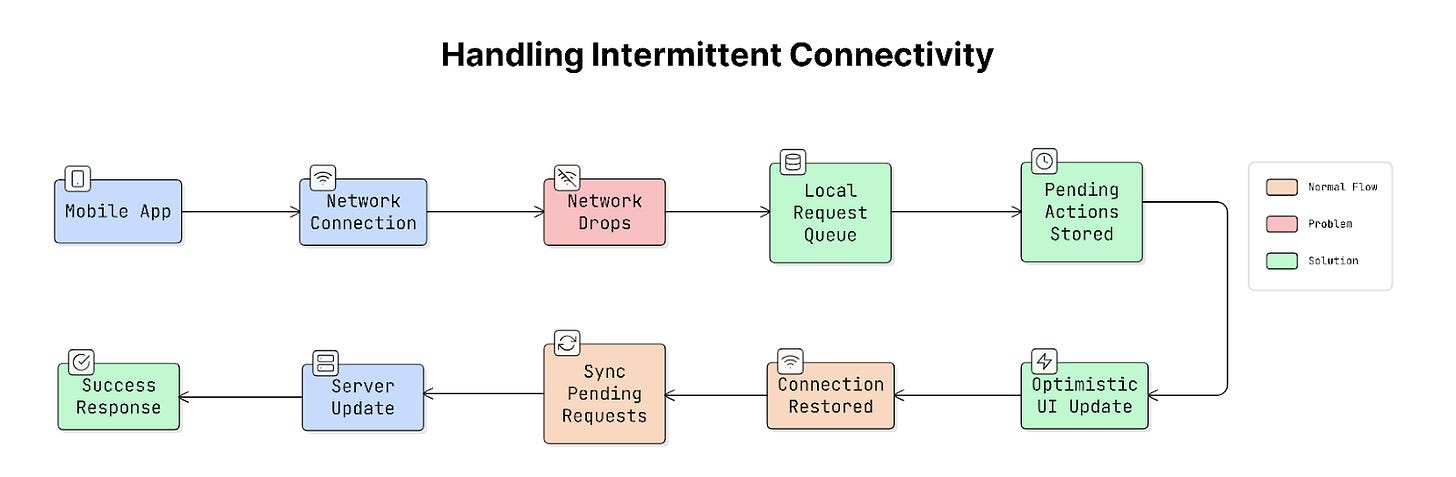
Mobile apps should continue working as smoothly as possible even when the internet connection is weak or temporarily unavailable. Instead of failing immediately, the app should adapt to the network situation and recover when the connection returns.
Use these techniques to handle this:
a. Local Request Queuing
When the device is offline, the app can store user actions locally rather than sending them to the server immediately.
For example:
- A user sends a message.
- The app saves the message locally.
- When the internet connection returns, the app sends it to the server.
This is called request queuing. The app keeps a list of pending actions and processes them once the network is available again.
b. Optimistic UI
Another common technique is optimistic UI.
With optimistic UI, the app updates the interface immediately, assuming the request will succeed.
For example:
- A user likes a post.
- App shows the post as liked instantly.
- Request is sent to the server in the background.
If the request fails later, the app can correct the state.
This makes the app feel fast and responsive, even when the network is slow.
c. Network State Awareness
Apps can also monitor the device’s network status.
This allows the app to know when it is online, offline, or on a slow connection.
Based on this information, the app can adjust its behaviour. For example, it might delay data syncing while offline and resume syncing when connectivity returns.
Why It Matters
Users frequently lose internet access during normal usage.
For example, in subway tunnels, on airplanes, or in areas with weak network coverage. If an app crashes, freezes, or loses user data, it feels unreliable.
Properly handling connectivity problems makes the app feel stable and trustworthy.
Real-World Example
Many modern apps handle intermittent connectivity this way:
- Notion queues edits locally and syncs them later.
- Google Docs allows you to continue editing even when offline.
- Messaging apps show a “sending” or “pending” status until the message is delivered.
Practical Tip
Mobile operating systems provide built-in tools to monitor network connectivity:
- NWPathMonitor on iOS
- ConnectivityManager on Android
These tools notify the app when the network status changes.
This approach is event-driven and battery-efficient, unlike constantly checking the network in a loop.
Even with reliable networking strategies, mobile apps cannot always depend on an internet connection. To keep the app fast and usable even without internet access, developers use caching.
Caching & Offline
This section focuses on how mobile apps store and reuse data to reduce network requests and improve performance.
You’ll learn how caching strategies and offline-first approaches help apps stay fast and usable even when the internet is slow or unavailable.
11. On-Device Caching (Memory vs Disk)
Mobile apps usually store cached data in two places on the device:
- Memory (RAM)
- Disk (device storage)
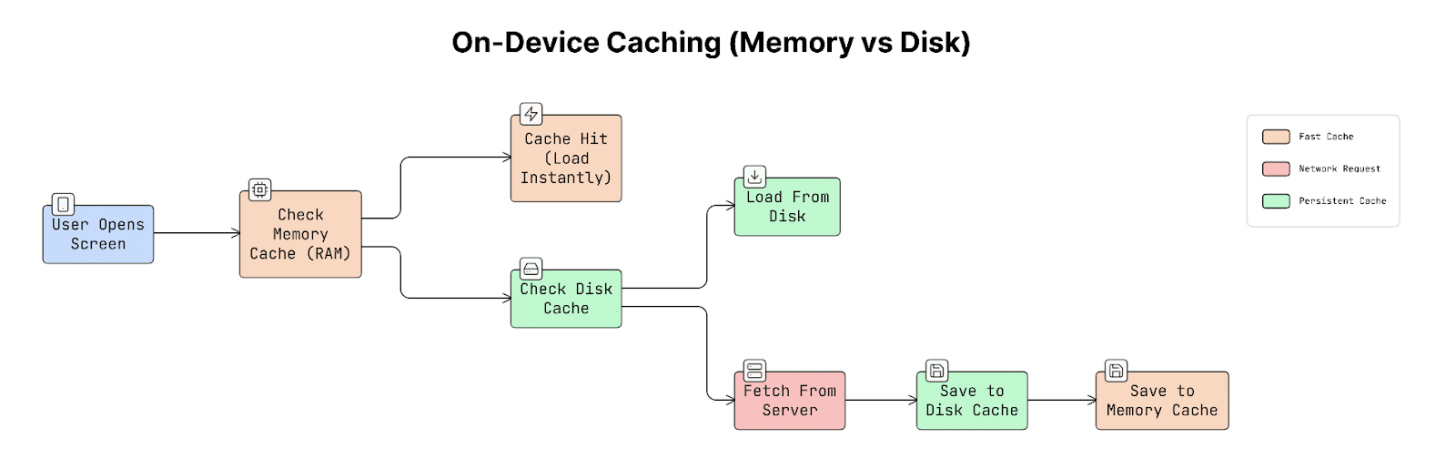
Using both together creates a two-layer caching system.
a. Memory Cache (RAM)
Memory cache stores data in device RAM, which is extremely fast to access.
When data is stored in memory:
- App can load it almost instantly.
- It avoids making a network request.
Yet memory has a limitation:
- Data disappears when the app closes.
- Operating system may remove cached data if the device runs low on memory.
So memory caching is fast but temporary.
b. Disk Cache (Storage)
Disk cache stores data on the device’s permanent storage.
This means:
- Data remains available even after the app restarts.
- App can load previously downloaded data without contacting the server again.
But disk access is slower than memory access.
So disk caching is slower than RAM but more persistent.
Why It Matters
Fetching data from the server can take 50–500 milliseconds, depending on the network. But reading data from memory happens in nanoseconds, which is almost instantaneous.
So if the app can load data from the cache instead of the network, the user interface feels much faster. For example, profile pictures, app configurations, or recently viewed content.
These are perfect candidates for caching.
Real-World Example
Many image-loading libraries use this two-layer caching approach. For example, SDWebImage and Kingfisher.
When an image is requested:
- App first checks the memory cache.
- If it’s not there, it checks the disk cache.
- Only if both are missing does it requests image from the network.
This makes images load almost instantly.
Trade-offs
Both types of caching have advantages and limitations:
- Memory Cache: Extremely fast, but cleared when the app closes.
- Disk Cache: Data remains available after restarting the app, but reading from disk is slower than memory.
Cache size also needs to be controlled carefully.
If too much memory is used for caching, the operating system may remove the cached data or close the app to free memory.
Practical Tip
Mobile platforms provide built-in caching tools that automatically manage memory. For example, NSCache on iOS and LruCache on Android.
These systems automatically remove older items from memory when the device is running low on resources. This helps prevent the app from using too much memory.
Using simple data structures like dictionaries or hash maps for caching is NOT ideal, because they do not automatically respond to memory pressure. As a result, they may keep too much data in memory, increasing the risk that the app will be terminated by the operating system.
Local caching stores data on the device, which helps apps load faster.
But the internet itself also has built-in caching mechanisms that can reduce unnecessary network requests. This is where HTTP caching becomes useful.
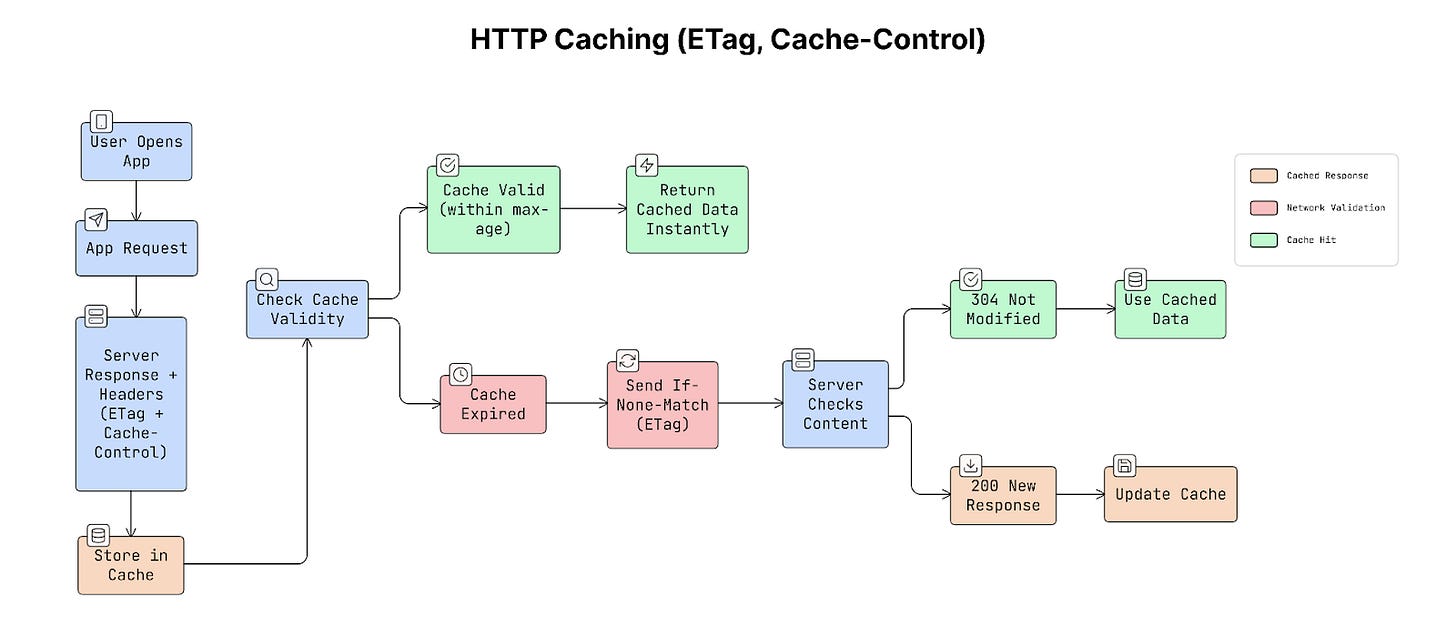
12. HTTP Caching (ETag, Cache-Control)
HTTP caching allows apps and browsers to reuse previously downloaded responses instead of requesting the same data again.
This is controlled using special HTTP headers, Cache-Control, and ETag. These headers tell the app two important things:
- How long can cached data be reused
- How to check if the data has changed
a. Cache-Control
This header tells the app how long it can reuse the cached data before asking the server again.
Cache-Control: max-age=300
This means the response can be reused for 300 seconds (5 minutes).
During those 5 minutes, the app can load the data directly from cache instead of making a new request to the server.
This improves speed and reduces network usage.
b. ETag
An ETag is a unique identifier that represents a specific version of the data.
When the server sends a response, it also includes an ETag value:
ETag: “abc123”
When the app requests the same data again, it sends that value back to the server:
If-None-Match: “abc123”
The server checks whether the data has changed:
- If the data has NOT changed, the server returns
304 Not Modifiedwith no response body. - If the data has changed, the server sends the new data.
This saves bandwidth because the server does NOT need to resend the entire response.
Why It Matters
HTTP caching reduces unnecessary network requests.
For example, if an API response is 200 KB, returning a 304 Not Modified response avoids downloading that 200 KB again.
This helps improve app performance, network efficiency, and battery usage. The best part is that HTTP caching works automatically when the correct headers are set.
Real-World Example
A news app might load a list of articles using an API. The server might return a header like this:
Cache-Control: max-age=60, stale-while-revalidate=300
This means cached response can be used for 60 seconds. After that, the app can still show the cached content while checking for updates in the background.
As a result, the articles appear instantly without showing a loading spinner.
Trade-offs
Different caching strategies have different advantages:
- Strong caching (long max-age): Faster loading and fewer network requests, but the data may become outdated.
- Weak caching (ETag validation): Always checks if data is fresh, but still requires a small network request.
Because of this, cache durations should match the frequency of data changes.
Caching helps apps load data faster, but it still depends on the network at some point. When the network connection disappears completely, caching alone cannot solve the problem.
To keep apps usable even without a network connection, many apps use a design approach called offline-first architecture.
13. Offline-First Architecture
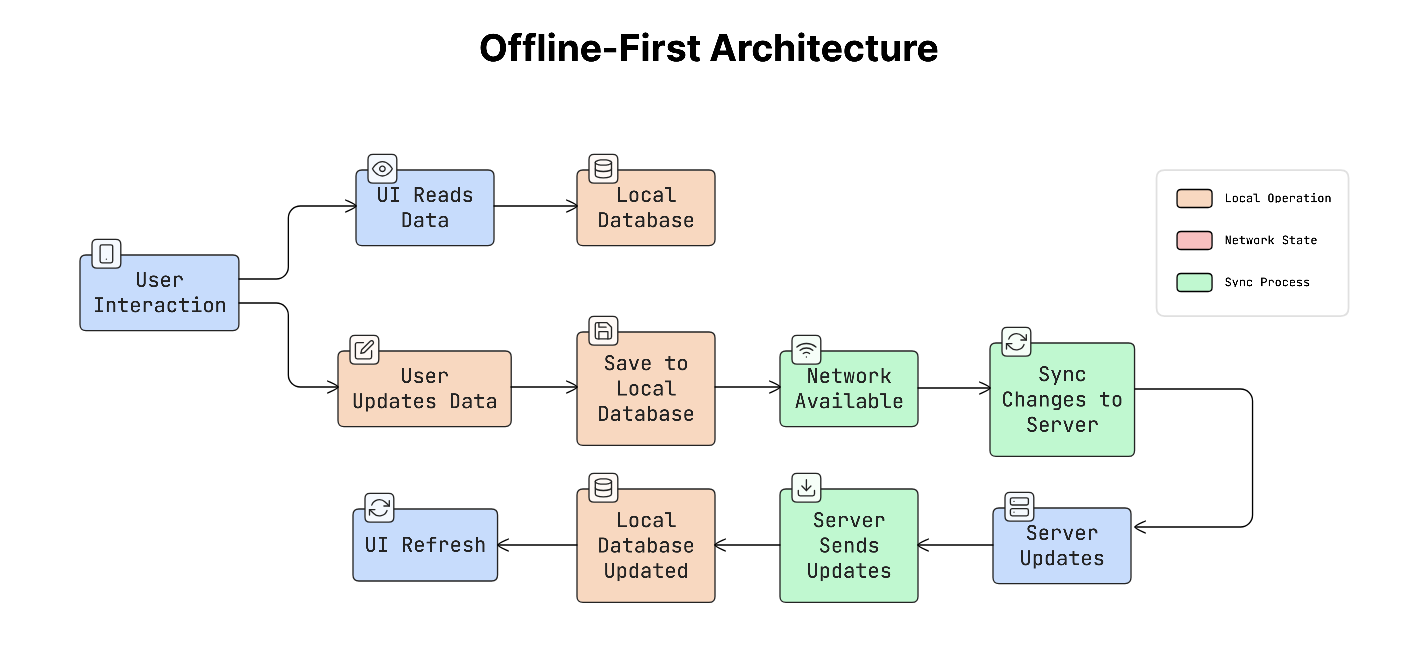
Offline-first architecture means the app is designed to work normally even without a network connection.
Instead of always asking the server for data, the app mainly works with data stored locally on the device. The app shows and updates local data first, and then synchronises changes with the server when the network becomes available.
This approach helps the app stay fast and responsive, even when the network is slow or unavailable.
How It Works
In an offline-first system, the app reads and writes data from local storage first.
The process usually works like this:
- The app reads data from the local database instead of requesting it from the server.
- When the user makes a change, the app updates the local database immediately.
- A background process then sends those changes to the server when a connection is available.
- If the server has new updates, the app downloads them and updates the local database.
- When the local data changes, the app automatically updates the user interface.
Because the UI always reads from local data, the app feels fast and responsive.
Why It Matters
Apps that depend entirely on the network often feel slow.
Every action requires a request to the server, which can take 100–300 milliseconds or more. This delay often appears as loading spinners.
Offline-first apps avoid this problem.
Since the UI reads from local data, interactions feel instant, while the network syncing happens quietly in the background.
Real-World Example
Many popular apps use an offline-first architecture:
- Spotify downloads playlists so they can be played without internet.
- Notion saves edits locally and syncs them later.
- Google Maps stores map tiles for offline navigation.
Apps dealing with media, productivity, or travel benefit from this approach.
Trade-offs
Offline-first systems provide a better user experience, but they are complex to build.
They require:
- Local database to store data
- Sync system to send and receive updates
- A way to handle conflicts when local and server data differ
- Plan for updating the data structure over time
Because of this complexity, an offline-first design usually needs to be planned early in app development.
Caching helps apps reuse data locally, but another challenge is delivering large files like images and videos efficiently. These files often make up most of the data in app downloads.
To improve speed and reduce data usage, use techniques like CDNs and media optimisation.
14. CDN Strategy & Media Optimisation
Images and videos usually make up a large part of the data used by mobile apps.
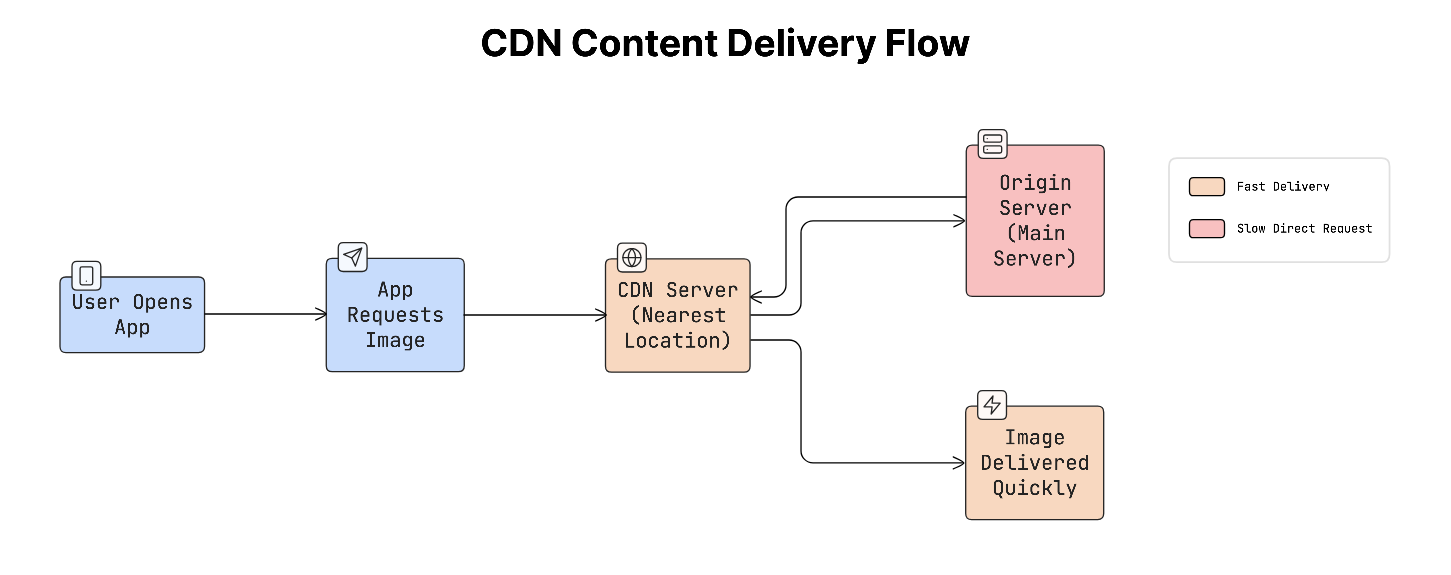
To deliver this content quickly and efficiently, apps often rely on Content Delivery Networks (CDNs) and various optimisation techniques. A CDN is a network of servers distributed around the world. Instead of downloading content from a central server, the app downloads it from the nearest server, reducing load time.
While media files can be optimised, the app only downloads what it actually needs.
What a CDN Does
When a user opens an app and requests an image/video:
- The request is sent to the closest CDN server.
- CDN returns the file from a nearby location instead of a distant server.
- The content loads faster because the distance and network delay are reduced.
This speeds up and improves the reliability of content delivery, especially for users in different parts of the world.
Media Optimisation
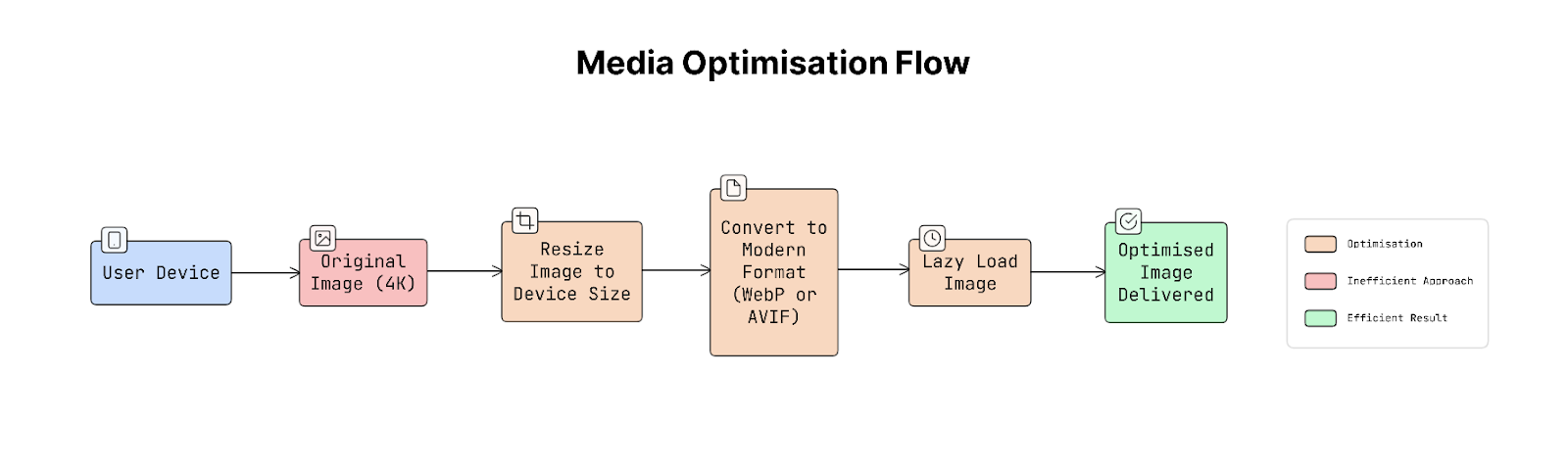
Another important improvement is optimising the size and format of images and videos.
Some common techniques include:
- Image resizing: Instead of sending a large image (e.g., 4K), the server sends a smaller version that fits the device screen, such as 200×200 pixels.
- Modern image formats: Newer formats like WebP or AVIF store images more efficiently than older formats like JPEG or PNG. They provide similar image quality with smaller file sizes.
- Lazy loading: Images are loaded only when they are about to appear on the screen. This avoids downloading content that the user might never see.
Together, these techniques significantly reduce data usage and improve loading speed.
Why It Matters
Large media files can slow down apps and consume a lot of mobile data.
For example, loading a 4MB image on a small phone screen wastes most of its pixels because the device only displays a small portion of the image’s resolution.
Serving images that match the device size can reduce total data usage by up to 80%, making the app faster and more efficient.
Real-World Example
Many popular apps rely on CDN and media optimisation:
- Cloudinary and Imgix dynamically resize images based on URL parameters.
- Instagram serves images that match the exact resolution of the user’s device.
- On modern Android devices, Instagram also uses the AVIF format to reduce image size.
Trade-offs
Using a CDN improves performance but introduces additional cost, as CDN providers charge based on data transfer.
As a result, CDN assets are usually cached for long periods. Apps often use versioned or hashed URLs to update assets. This process ensures that the new version gets downloaded when needed.
Practical Tip
To make images appear faster, apps often show a temporary low-quality preview while the full image loads.
Techniques like BlurHash or LQIP (Low Quality Image Placeholder) display a blurred or low-resolution version first. This makes the page feel fast, even before the high-quality image finishes loading.
Even with strong caching and efficient content delivery, one important challenge remains: keeping cached data accurate and up to date.
15. Cache Invalidation Strategies
Caching helps apps load data faster by storing it locally.
But cached data can become outdated when the original data on the server changes. Because of this, apps need a way to update or remove old cached data. This process is called cache invalidation.
In simple terms, cache invalidation means deciding when cached data should no longer be used and needs to be refreshed.
Why It Matters
If outdated data stays in the cache for too long, the app may show incorrect information.
For example, a user might see an old product price, a deleted message, or an outdated address. In these situations, showing stale cached data can be worse than not using a cache at all.
That’s why managing cached data correctly is very important!
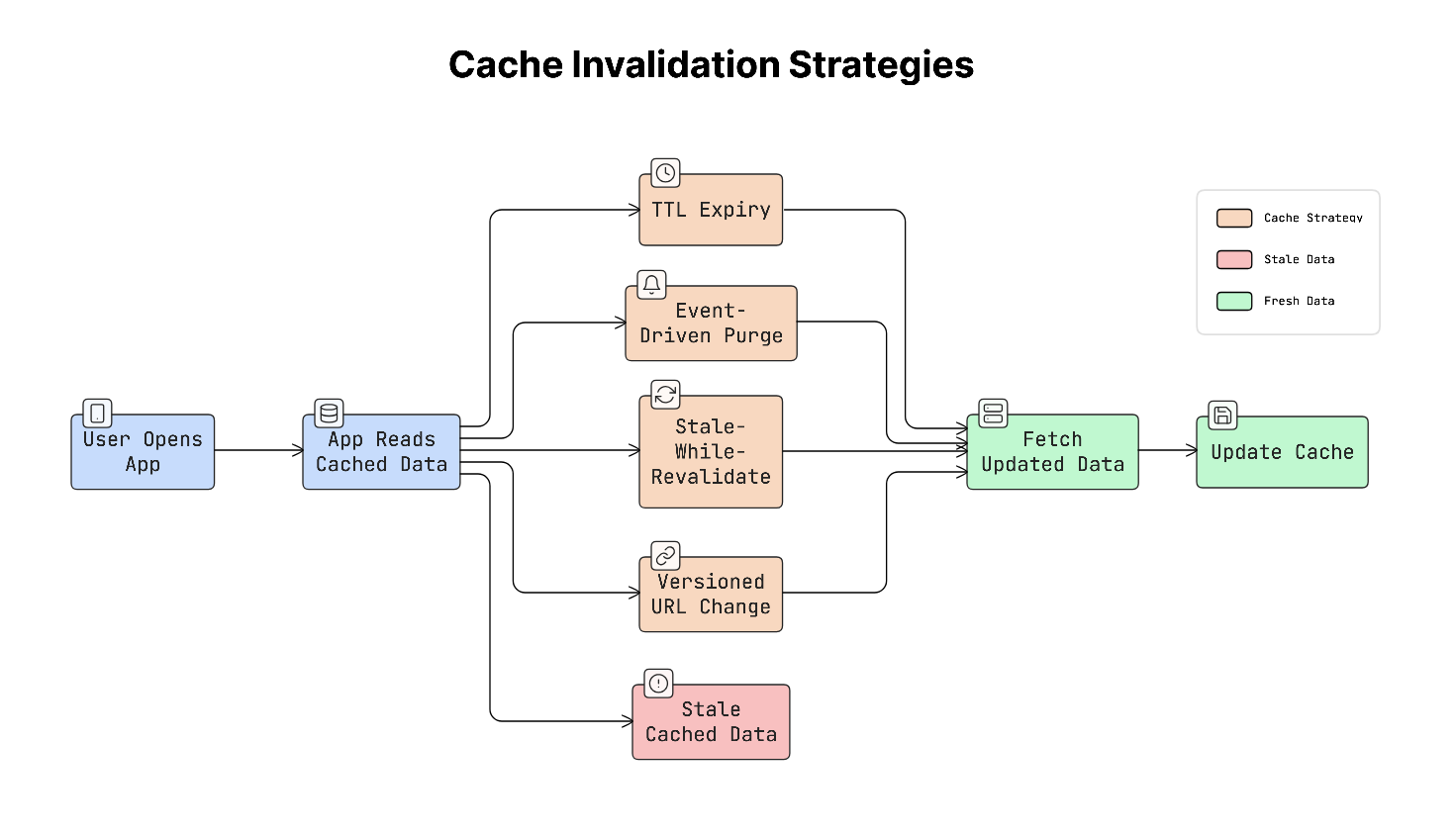
Common Cache Invalidation Strategies
There are several common ways to control when cached data should expire or update:
a. TTL (Time-To-Live)
TTL means cached data is only valid for a certain amount of time.
For example, if a cache has a TTL of 5 minutes, the app will reuse the cached data for five minutes. After that, it must fetch fresh data from the server.
This approach is simple but may briefly show outdated data.
b. Event-Driven Invalidation
In this approach, the server actively tells the app when cached data is no longer valid.
For example, a product price changes, and the server sends an event to clear or update the cache.
This ensures the app always shows the latest data, but it requires more complex systems to send these updates.
c. Stale-While-Revalidate
This strategy allows the app to show cached data immediately, even if it is slightly outdated.
The app quietly requests fresh data in the background. When the new data arrives, the cache is updated.
This approach improves the user experience by loading the app instantly while keeping data up to date.
d. Versioned URLs
Sometimes cached assets like images or style sheets are stored for a very long time.
To update them safely, the filename or URL includes a version or hash.
Example:
style.abc123.css
When the file changes, the version in the URL changes. Because the URL is different, the cache automatically downloads the new file.
Real-World Example
An e-commerce app might use different caching strategies depending on the data.
For example:
- Product listings may use a TTL of 5 minutes, since a short delay in updates is acceptable.
- Inventory or pricing data may use event-driven invalidation because it must always be accurate.
- Static assets, such as images or stylesheets, can use versioned URLs, allowing them to be cached for a long time.
Trade-offs
Each caching strategy has its advantages and limitations:
- TTL-based caching: Simple to implement, but cached data may briefly become outdated.
- Event-driven invalidation: Keeps data accurate but requires more complex infrastructure.
- Stale-while-revalidate: Makes the app feel fast, but temporarily shows slightly outdated data.
Important Tip
Caches should never have infinite expiration times for data that changes frequently.
If cached data never expires, the app may continue showing outdated information, making it difficult to detect and debug.
Once data is cached or fetched, the app also needs a reliable way to store and organise that data locally, which leads to the next part: storage and database design.
Storage & Data
Mobile apps need efficient ways to store and manage data on the device.
This section explains how local databases, schema design, and pagination help apps handle large datasets while maintaining smooth performance on resource-limited devices.
16. Local Database Design (Schema Modeling)
Mobile apps often store data locally on the device so they can load information quickly and continue working even when the network is slow or unavailable.
To do this, apps use local databases such as SQLite, which is commonly used on both Android and iOS. A database schema simply describes how data is organised in the database. It defines tables, columns, and how different pieces of data are connected.
Good schema design is important because it helps the app load and display data quickly.
How Data Is Often Structured on Mobile
On servers, databases are usually designed to avoid duplicating data across many places. This approach is called normalisation.
But mobile apps often use a slightly different approach called denormalisation.
Denormalisation involves storing related data in the same table, enabling quick reads without complex queries.
This helps mobile apps load data faster because the app does NOT need to combine multiple tables every time it displays information.
Why It Matters
Mobile apps need to display data quickly.
For example, imagine an app showing a list of 50,000 messages. If the database is poorly designed, finding the right messages might take much longer than expected.
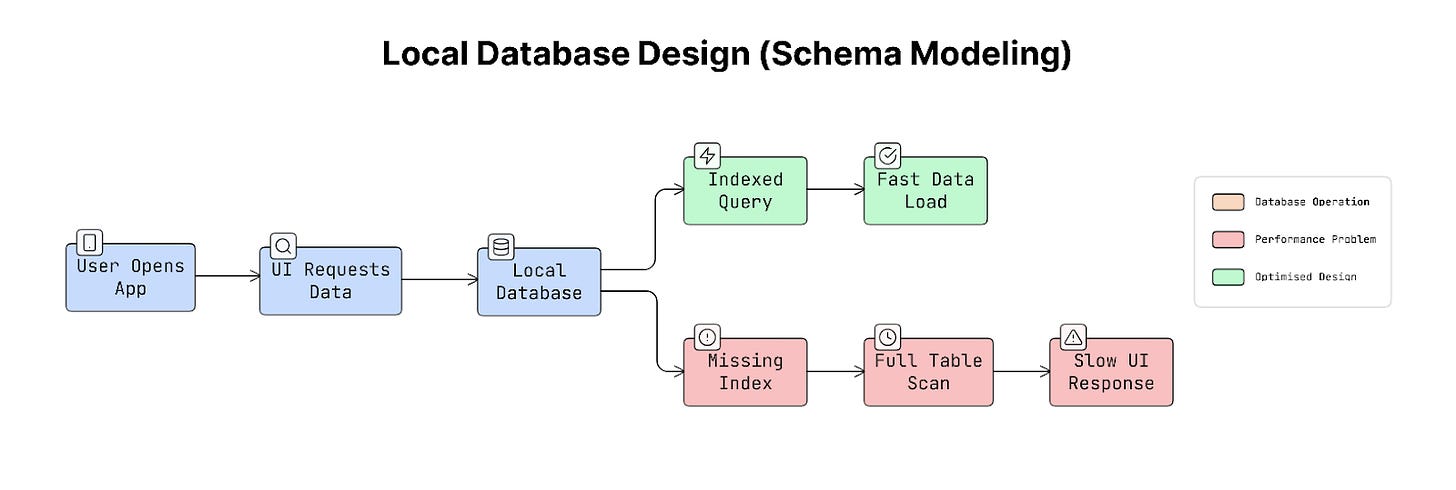
A missing index (a structure that helps the database locate data quickly) can cause the database to scan every row in a table. This can turn a 1-millisecond query into a 500-millisecond query, causing visible delays or lag in the user interface.
So the way a database is designed directly affects how smooth the app feels.
Real-World Example
Consider a messaging app.
Instead of storing only a user ID with each message, the app may also store the sender’s name and profile image directly inside the message record.
This means the app can display messages immediately without looking up additional data from another table.
This approach speeds up loading when thousands of messages need to be shown quickly.
Trade-offs
Each database design approach has advantages and disadvantages:
- Denormalised structure: Faster data reading and works well for displaying lists in the UI, but updating repeated data can be harder. For example, if a user changes their name, multiple records may need to be updated.
- Normalised structure: Cleaner, more organised, and easier to maintain consistent data, but requires more complex queries, which may slow down UI rendering.
Because mobile apps mostly read data to display it on the screen, they often prefer denormalised structures for faster reads.
Practical Tip
When writing many records to the database, it’s usually faster to group them into a single transaction.
Instead of saving each item one by one, the app saves many items together in a single operation. This reduces overhead and makes database writes much more efficient.
As apps grow and evolve over time, the database structure may need to change as well. Because of this, apps must handle database schema updates carefully, which leads to the next topic: schema migration strategies.
17. Schema Migration Strategy
Mobile apps often store data in a local database on the device.
Over time, the app may change how this data is structured. For example, a new version of the app might add a new column, change a table, or introduce new data fields.
When this happens, the database structure must be updated safely. This process is called schema migration.
A schema migration ensures that the existing database on a user’s device is updated to match the new version of the app.
Why It Matters
Unlike a web server, mobile databases exist on millions of individual devices that developers cannot directly control.
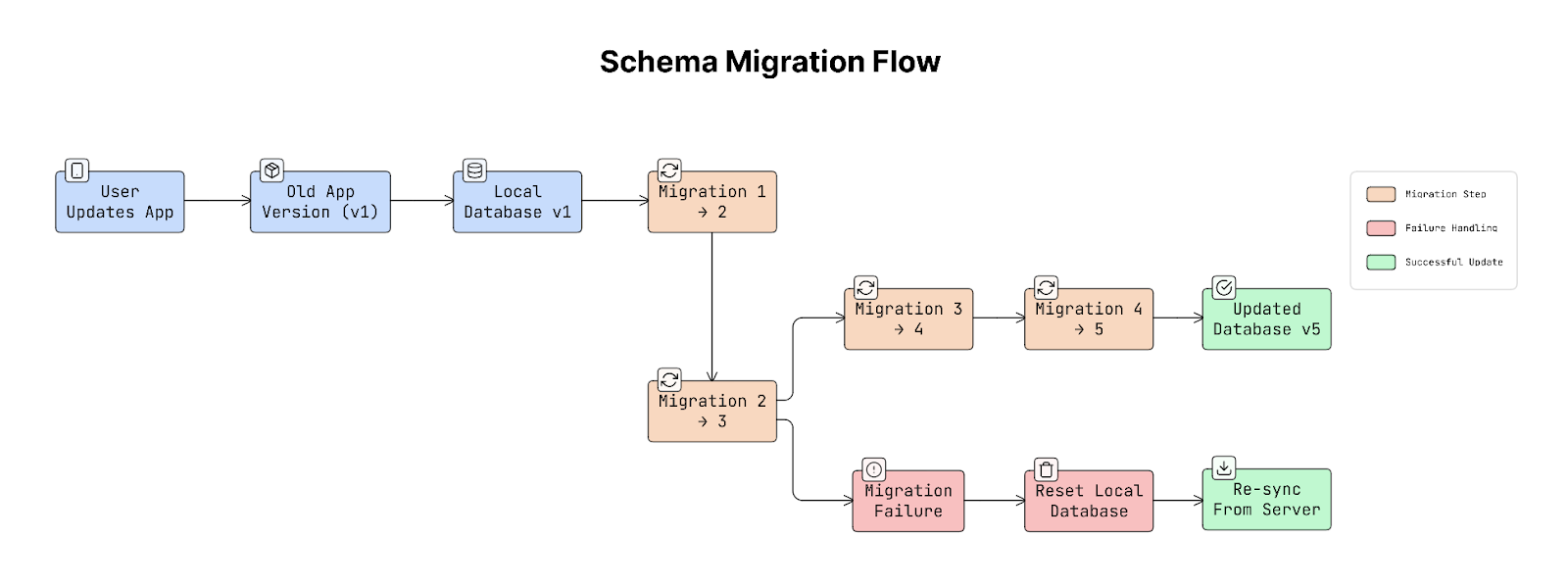
Some users may update the app immediately, while others may skip several versions before updating. For example, a user installs version 1 of an app and later updates directly to version 5.
The database must correctly apply every change that happened between those versions. So the migrations must run step-by-step:
1 → 2 → 3 → 4 → 5
If a migration fails, the app may crash on launch. Because the database exists on the user’s device, fixing it later can be difficult…
Real-World Example
Many mobile frameworks provide tools to manage database migrations.
For example, Room on Android requires every database version to define how the schema should be updated.
This helps prevent mistakes where the app changes the database structure without providing a safe upgrade path.
Trade-offs
There are two main ways to handle schema changes:
a. Destructive Migration
In this approach, the app deletes the existing database and creates a new one.
This is simple and safe for the app structure, but it removes all locally stored data.
b. Additive Migration
In this approach, the database is updated without deleting existing data.
For example, adding new columns, adding new tables, and keeping old data intact.
This method is usually preferred because it preserves user data.
Practical Tip
Sometimes migrations may fail due to issues like a corrupted database.
In these situations, it is better for the app to reset the database and re-download the data from the server rather than crash. Losing cached data can be recovered, but an app that keeps crashing when it starts creates a much worse experience.
As apps handle larger amounts of stored data, another important challenge appears: loading and displaying large datasets efficiently, which is where pagination becomes useful.
18. Pagination (Cursor vs Offset vs Page Number)
Mobile apps often display long lists of data, such as messages, posts, products, or search results.
Sometimes these lists can contain thousands of items.
Loading all of that data at once would be slow and would use a lot of memory. Because of this, apps usually load data in smaller chunks called pages. This technique is called pagination.
Pagination helps apps load content gradually as users scroll, keeping the app fast and responsive.
How It Works
Instead of loading everything at once, the app requests a small set of items at a time.
For example:
- App requests page 1 of data.
- The server returns the first group of items.
- When the user scrolls further, the app requests the next page.
This process continues until the user reaches the end of the list…
Common Pagination Methods
There are three common ways to implement pagination:
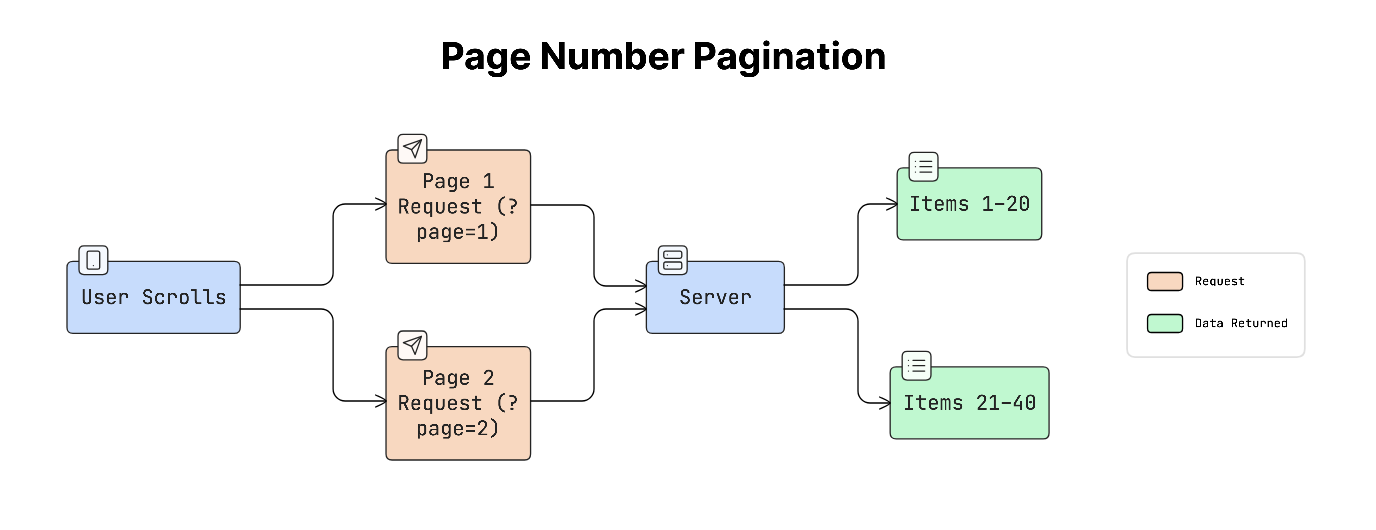
a. Page Number Pagination
This is the simplest method. The client requests data using page numbers.
For example:
?page=1
?page=2
?page=3
Each page contains a fixed number of items.
This approach is easy to understand and works well for things like search results or product listings.
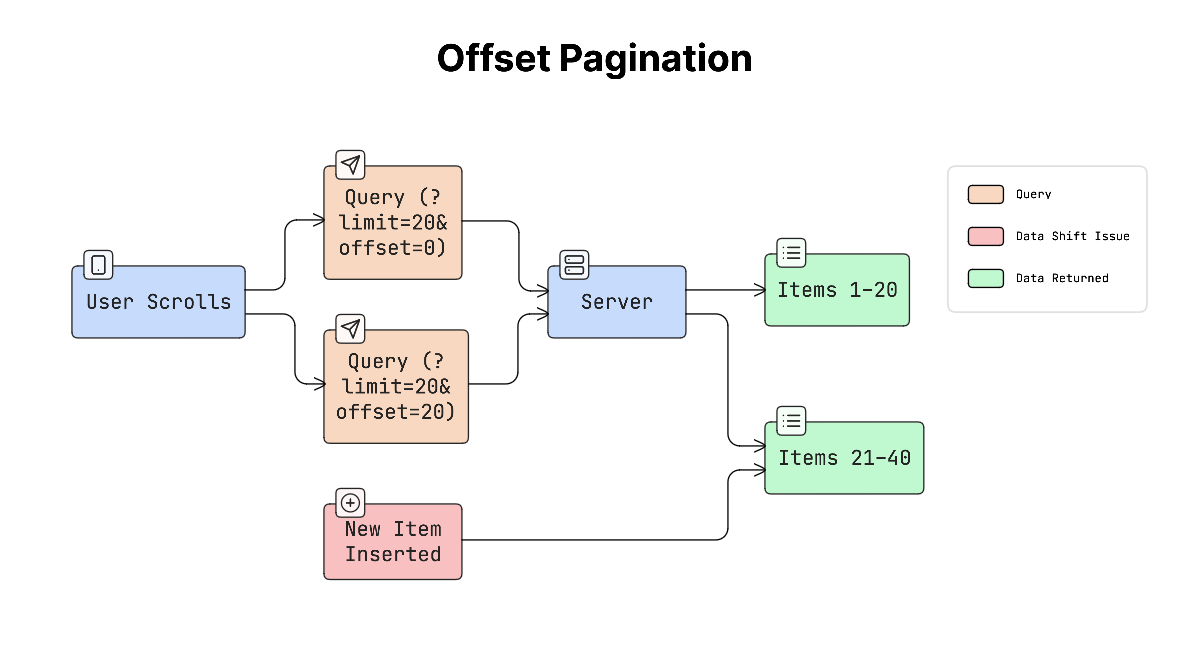
b. Offset Pagination
Offset pagination retrieves data starting from a specific position.
For example:
?limit=20&offset=40
This means skip the first 40 items and return the next 20 items.
This method works well for static data, but dynamically adding new items while the user is browsing can cause problems.
For example, if new posts appear at the top of a feed, the list may show duplicate items or skip items.
c. Cursor Pagination
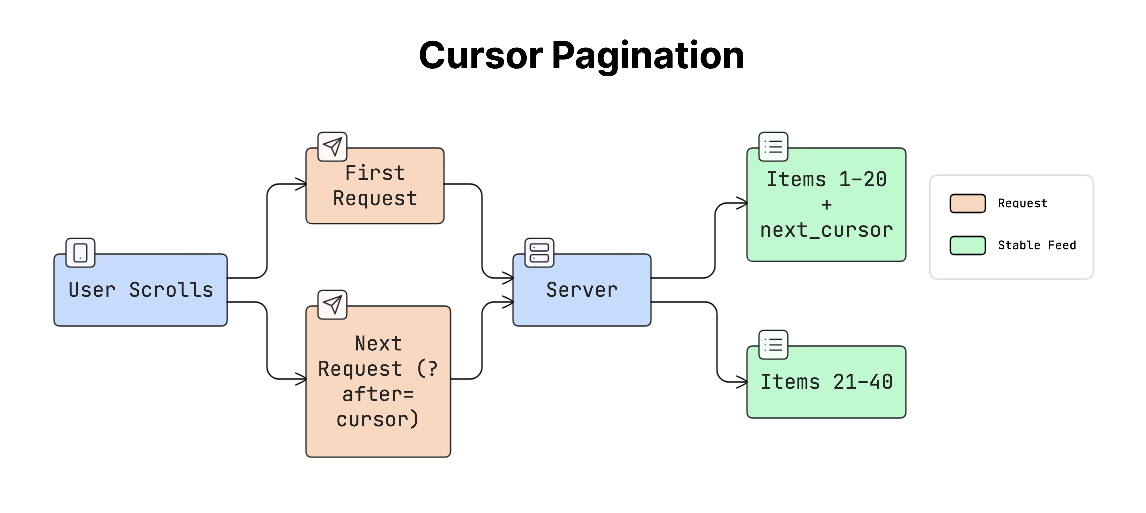
Cursor pagination uses a cursor token that represents the last item the user has seen. Instead of requesting a page number, the app requests the next items after a specific position.
For example:
next_cursor = “abc123”
Then the next request might look like:
?after=abc123
The cursor usually represents a stable value, such as the ID or timestamp of the last item. This approach works well for data that constantly changes, such as social media feeds.
Why It Matters
Imagine a social feed with 10,000 posts. If the app tried to load everything at once:
- The request would take a long time
- Rendering the UI would be slow
- Device might run out of memory
Pagination solves this by loading only a small portion of the data at a time, which keeps scrolling smooth.
Real-World Example
Many popular apps, such as Twitter, Instagram, and TikTok, rely on cursor-based pagination.
These apps load new posts as the user scrolls, using a cursor that points to the last item that was displayed.
This ensures the feed remains stable even when new posts appear…
Trade-offs
Each pagination method has advantages and limitations:
- Page number pagination: Simple to understand and works well for search results, but less efficient for large datasets.
- Offset pagination: Easy to implement and allows jumping to any position, but it can break when new data is inserted.
- Cursor pagination: Stable and efficient for live feeds and prevents duplicates and skipped items, but does not easily support jumping directly to a specific page.
Because mobile devices have limited memory and storage, loading and storing data must be done carefully! Therefore, it’s important to design efficient data models that work well within these constraints.
19. Data Modeling for Mobile Constraints
Mobile apps often store data locally on the device so they can load information quickly and continue working even when the network is slow.
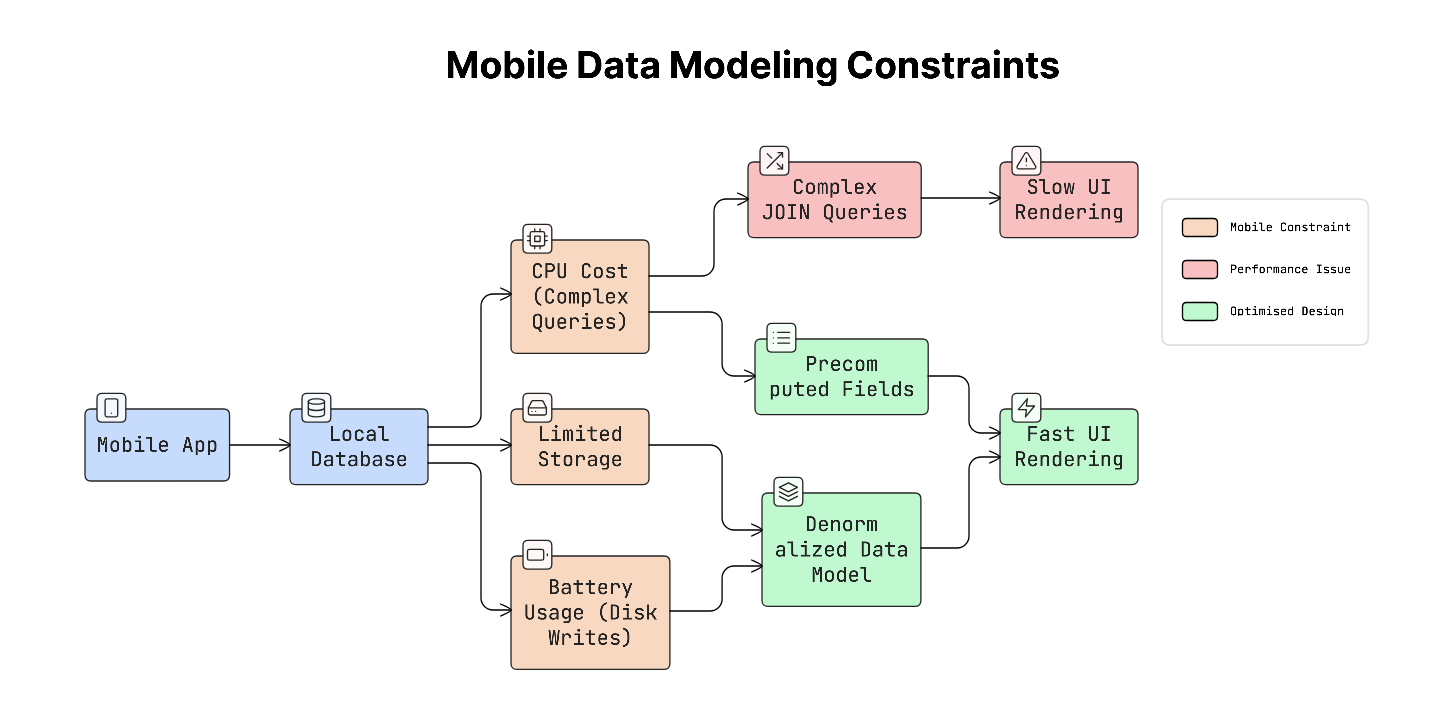
Yet mobile devices have limited storage, CPU power, and battery, so the way data is structured must be carefully designed.
Because of these limits, mobile apps usually store and organise data to help the UI load quickly, even if it means repeating some information.
Things Mobile Data Models Must Consider
When designing data models for mobile apps, several important constraints should be considered:
a. Limited storage
Mobile devices cannot store unlimited data.
Apps should avoid caching everything and instead remove old or unused data after a period of time. For example, an app might store cached data for a few hours or days, then automatically delete it.
b. CPU performance
Complex database queries can slow down the app.
Queries that join many tables may take longer to process. To keep the app fast, store related data together so the app can read it quickly without performing complicated queries.
c. Battery usage
Every time an app writes data to disk, it uses battery power.
Frequent database writes can drain the battery over time. Because of this, apps try to minimise unnecessary writes and batch operations when possible.
Why It Matters
Data models used on backend servers are usually designed to save storage space and keep data perfectly structured.
But mobile apps have a different goal: fast rendering on the screen.
This means the data model on mobile may look different from the backend data model, because it’s optimised for speed and user experience rather than strict structure.
Real-World Example
Imagine a contacts app that shows a list of people.
Instead of calculating everything each time the list loads, the app may store some information in advance, such as display name, profile picture URL, and the first letter used for alphabetical sections.
Because this information is already stored, the app can render the list instantly without performing extra calculations.
Trade-offs
Storing extra or pre-computed data improves speed, but it also has some downsides.
Pre-computed data uses more storage space and must be updated whenever the original data changes.
Yet this trade-off is usually acceptable because storage is relatively cheap, while slow or laggy interfaces are immediately noticeable to users.
Continue reading the remaining mobile system design concepts…